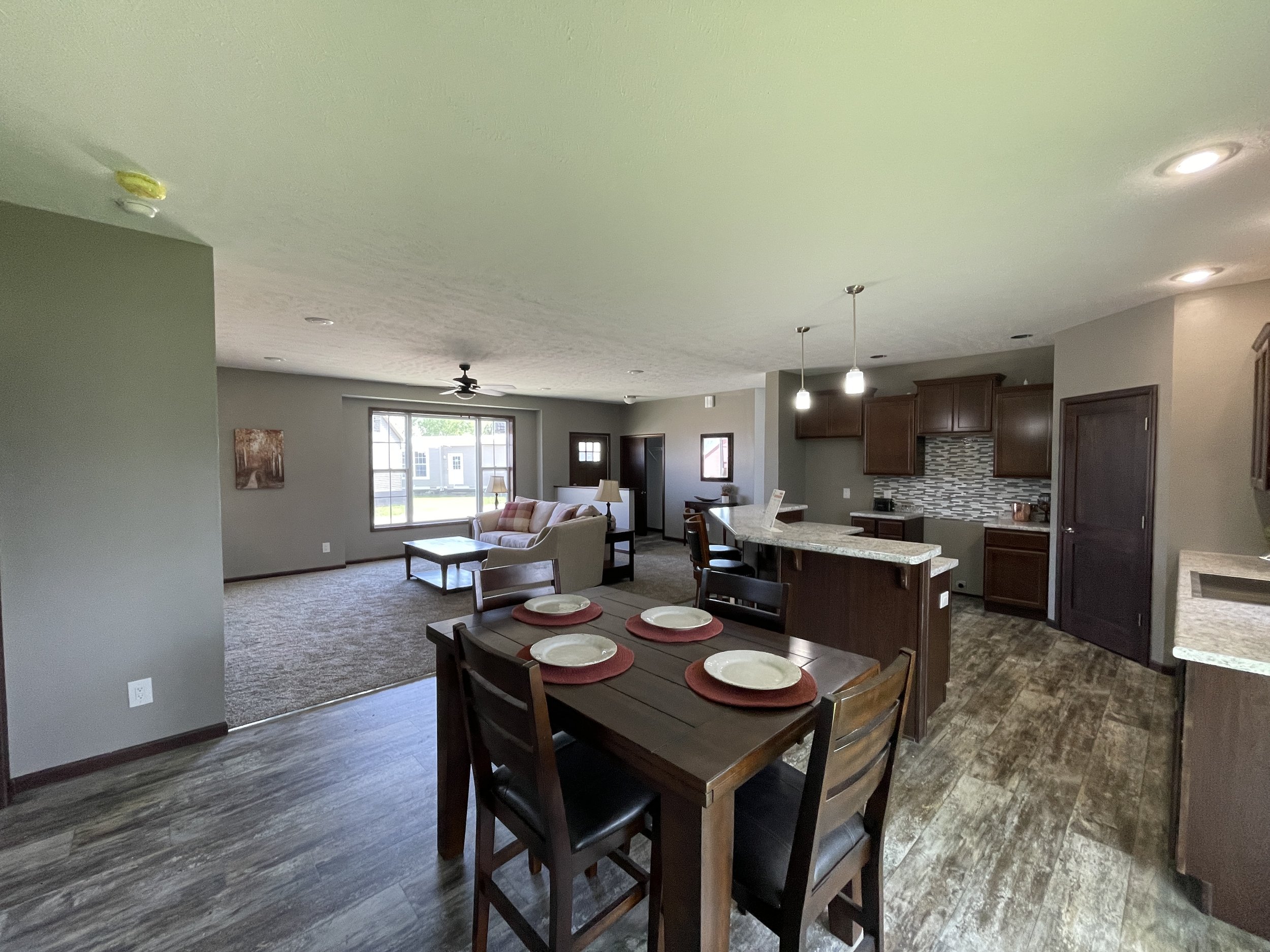

IF Display 5
Modular
30' X 60'
1,800 ft.²
3 beds
2 baths
This has been a very popular plan to order or a good starting point to modify into your perfect home. Walk into this home through the entry that is separated from the living room by a half wall. The Living room also has a bump out with picture window which also includes the Dutch gable roof on the front of the home. The kitchen has a raised eat-at island with a pull-out trash can and pots and pans drawer cabinet plus a corner walk-in pantry. The master bathroom has double sinks and an open walk-in tile shower with rain head shower head.
Upgrades from Standard:
Basement stair frame out, stairs $2,736
36in. Tall half wall with wood cap $300
Raised Floor over stairs $180
BUMP OUT W/ Dutch gable $6,308
9' Ceiling Package $5,400
Drywall plant shelf w/2 recessed lights $480
Large Span Living Room $360
Double Sink Vanity $540
Trapped Vanity Top $480
Serenity Shower - N3 $6,402
Install extra 2in vent to basement $132
GARAGE PREP-3 Way switch to J-Box $30
GARAGE PREP- 20amp circuit in J-box$72
ELEC - Paddle fan prep-omit light $96
220V receptacle for electric range $204
Flush mount canister light $240
Dimmer switch $84
Pendant light $120
100S- 2630 Tempered Glass $3,510
100S- 4050-2050 Picture w/two flanking $840
100S- Transom Only 6016 $990
Door E: Wood Grain Six Light $1,632
PATIO DOOR- Anderson 100S $1,800
EXT TRIM- 5 1/2in. Trim $612
SIDING COLOR-Group B $2,592
Group B Cabinets -Spring Valley $1,440
Roll out tray in center of base cabinet $600
CAB MISC-6in. rise in wall cabinet $72
CAB- 30in. Base pots and pan $360
CAB- Double Base Waste Basket $318
Custom Island $2,800
CAB MISC- Raise snack bar $225
TRIM PKG A $3,240
60oz carpet $3,240
Sheet Vinly Flooring $2,160
1/3 HP In-Sink-Erator Disposal $180
4x16 Subway Tile backsplash $990
Base Price:
OPTIONS:
TOTAL:
Base and option prices are subject to change